Use trends to identify a discussion, review the context with the driver and agree a specific improvement you can revisit.
Make the comparison fair
A driving score is a useful prompt, but it does not describe the whole job. Urban routes, vehicle type, payload, weather and congestion can affect how a journey looks. Start by comparing similar work and a driver’s own trend rather than relying on a single fleet-wide ranking.
Explain the purpose of monitoring and how the business uses the information. Give drivers a route to question an event or add context. If an event is linked to the wrong vehicle or driver, correct the underlying issue before drawing conclusions.
Look at the journey behind the score
Use the route and timing to understand what the reported behaviour relates to. A speed trace shows changes over time, while supported acceleration data can add other detail. Device capabilities matter: not every installation supplies accelerometer axes or the same event information.
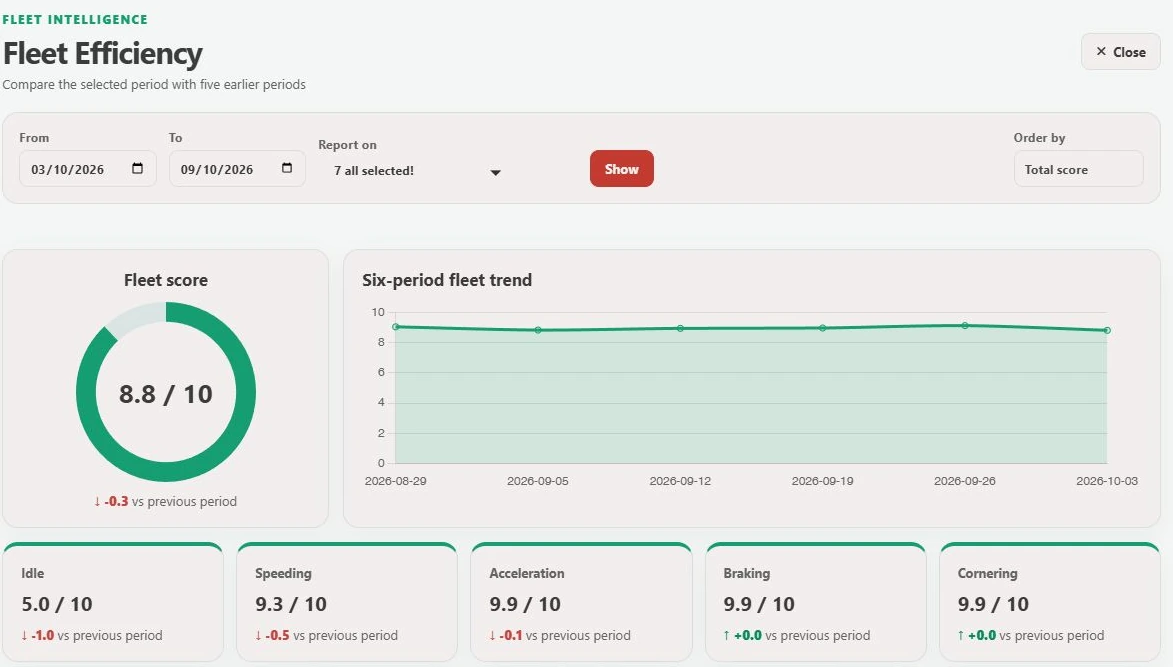
GTrak’s efficiency view includes idle, speeding, acceleration, braking and cornering scores, with trend periods. Its driving-dynamics view includes an activity timeline and speed trace. Review the evidence available for the chosen device rather than assuming every chart is populated.
Agree one change and revisit it
Choose a specific habit or process to work on. That could be reducing avoidable idling at a regular stop or planning more smoothly for a known section of route. Agree what the driver and office can each do to help.
Review a comparable period afterwards and recognise improvement as well as unresolved issues. Consistent follow-up makes the data part of a coaching routine rather than a one-off scorecard. Keep appropriate human review in any employment or disciplinary process.
- Check driver identification and data coverage.
- Compare similar vehicles and duties.
- Discuss journey context and hear the driver’s explanation.
- Agree an action and a date to review progress.
From explanation to a working example
See it for your fleet.
Talk to GTrak about your vehicles, available data and the tools your team needs.