Fuel usage & MPG
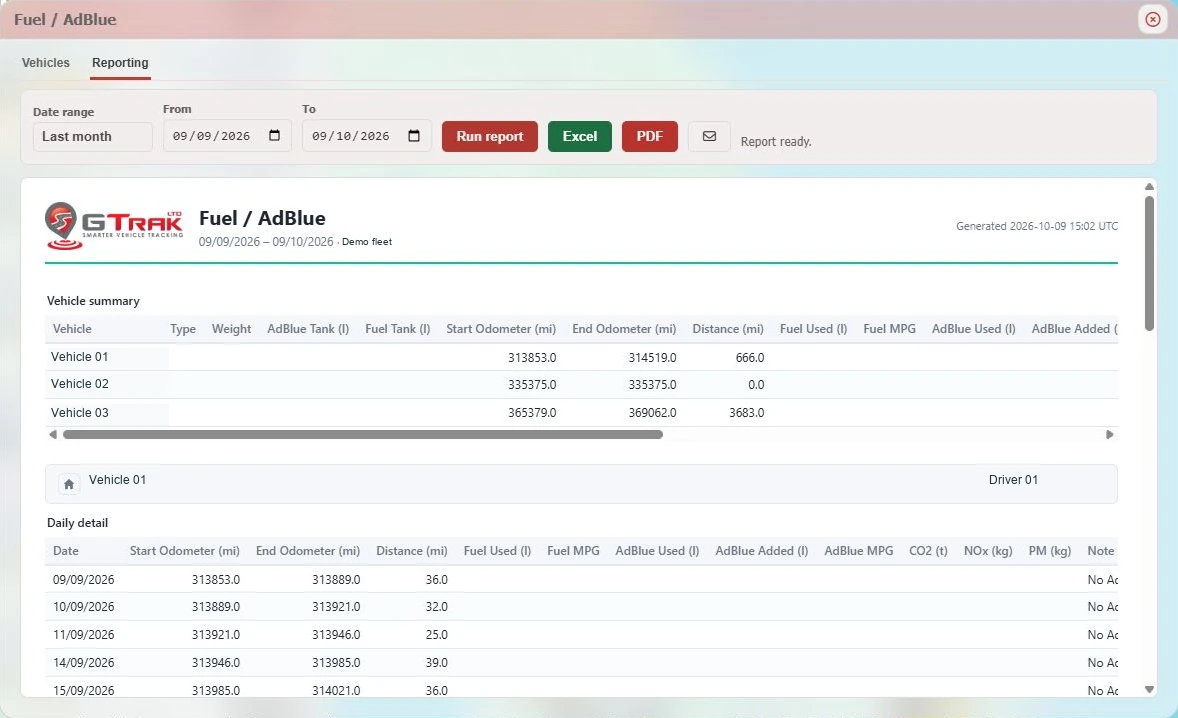
Review supported consumption and economy over a chosen period. Compare like-for-like work and use a consistent unit.

Understand what goes into every mile
Bring fuel, AdBlue and distance into the same conversation. GTrak turns supported CAN/FMS readings into reports that help you understand running costs, investigate changes and focus your next action.
Start with a clearer baseline
A receipt tells you what you bought. Vehicle readings and journey data help you review how your fleet used it. Choose a reporting period and explore available consumption, mileage and MPG without treating every vehicle as the same job.
Group comparable vehicles, look for repeated changes and check the journey context before drawing conclusions. Use available Excel and PDF exports to bring the review into your team’s routine.
Read our fuel-cost guide ↗The numbers, explained
Level, consumption and refills answer different questions. The right configuration gives them meaning.
Review supported consumption and economy over a chosen period. Compare like-for-like work and use a consistent unit.
Review available usage and additions alongside fuel and distance. Investigate unusual patterns with the workshop and driver.
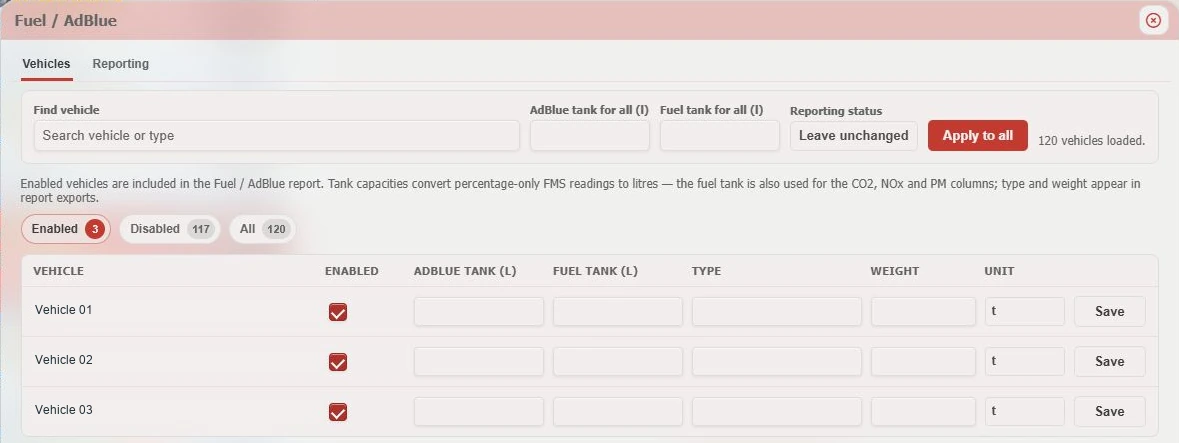
Where FMS supplies a percentage, the configured tank capacity gives litre calculations their context.
Supported mileage readings help relate usage to the work completed. Check coverage and the dates you are comparing.
Use journey and efficiency tools to explore reported idle time and driving patterns. Review the operational context before coaching.
Available CO₂, NOx and PM report fields use their required inputs. They are calculated outputs, rather than direct exhaust measurements.
AdBlue needs the right context
A tank showing 50% needs the correct capacity before that reading can be expressed in litres. GTrak’s setup lets you configure fuel and AdBlue capacities and enable reporting for the vehicles you select.
We confirm supported signals and configuration first. GPS alone cannot tell you AdBlue consumption, and a missing reading should never be treated as zero.
AdBlue monitoring explained ↗From data to action
Before you connect
No. Available signals depend on make, model, year, vehicle interface, device and installation. We confirm the readings your proposed setup can supply before recommending equipment.
A change in a tank reading does not by itself prove theft. Refills, vehicle movement, tank configuration and reporting gaps can affect the data. Discuss any monitoring or alert requirement with us so we can confirm what the specific setup supports.
No. Reported CO₂, NOx and PM fields depend on calculation inputs and configuration. They are not a direct measurement of exhaust emissions or an independently verified environmental audit.
There is no fixed saving for every fleet. Results depend on your starting point, routes, vehicles, loads and the operational changes you make. Use a baseline and comparable reporting periods to assess your own results.
A little more know-how
A practical way to connect fuel use, mileage and idling, then turn the findings into a focused improvement plan.
Read the guideUnderstand level, usage and refill information, why tank setup matters, and how to make comparisons useful.
Read the guideA plain-English introduction to vehicle interfaces, supported signals and the questions to ask before installation.
Read the guideLet’s look at your vehicle list
Share your makes, models, years and existing devices. We’ll check compatibility and show the reports that fit.